Doc Analyzer: Multi-Format Support and an Advanced Interface for Your Local AI
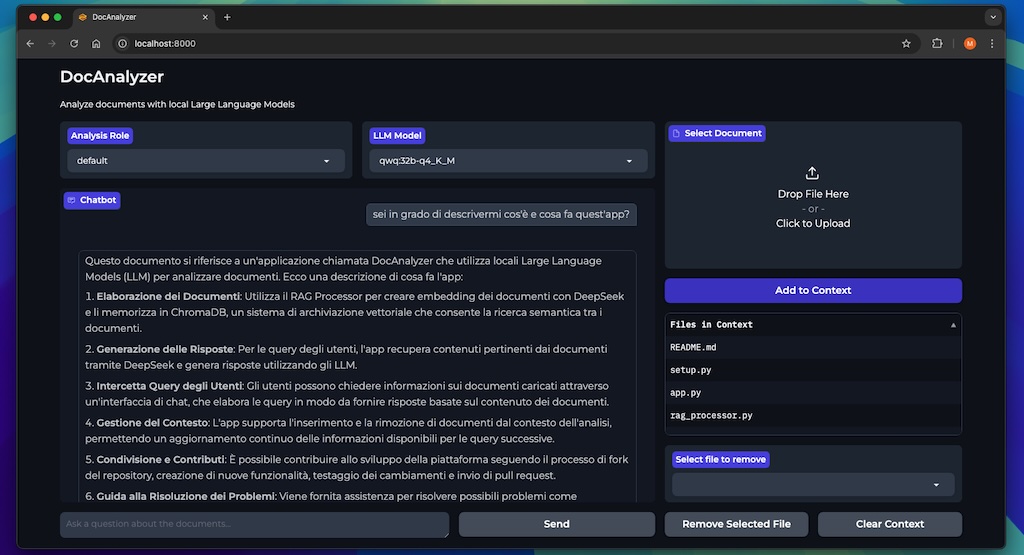
Hi everyone! I’m back to tell you about the latest updates to Doc Analyzer, our AI-based document analysis project that keeps all your data safe, locally.
Over the last few days I’ve implemented so many new features that Doc Analyzer might look like a practically brand-new tool. Let’s go through all the news together!
Multi-Format Support: From TXT to Dockerfile
The most important news in this update is the expansion of supported formats. Doc Analyzer is no longer limited to PDFs and Word documents: it can now analyze practically any kind of text file! And what’s even more interesting is that you can now add (and remove) multiple files to the context at once, overcoming the previous limitation of analyzing just one document at a time. This is a real game-changer for complex analyses that require pulling together information from different sources.
Plain Text Files (.txt)
Let’s start with the basics: TXT files are everywhere, from system logs to quick notes, and they’re often packed with valuable information. Doc Analyzer now handles them natively, letting you extract knowledge even from your most basic documents.
The implementation was relatively simple thanks to our modular architecture. The new TextProcessor integrates seamlessly with our factory system, automatically recognizing .txt files and processing them optimally for analysis.
RTF Files: When Formatting Matters
Rich Text Format (RTF) files are an interesting middle ground between plain text files and full-blown Word documents. Using the textract library, the new RtfProcessor is able to preserve important formatting during text extraction, thus keeping the context needed for a proper analysis.
Code, Markdown, and Even Dockerfiles (with a little trick…)
This is probably the feature developers have been waiting for the most! Doc Analyzer now supports analyzing code files in practically any programming language: Python, JavaScript, Java, C/C++, PHP, and many more.
The new CodeProcessor was designed to automatically recognize the programming language based on the file extension.
This means you can upload an entire source file and ask questions like:
- “What are the main features implemented in this code?”
- “Are there any potential bugs or security vulnerabilities?”
- “How could I improve the efficiency of this function?”
If you work in tech, you probably deal with Markdown (.md) and YAML (.yml/.yaml) files every day. These formats have become the standard for documentation and configuration, so supporting them natively was essential.
A small but big new feature is support for Dockerfiles, those extension-less files that define Docker container configurations. There’s a little trick: since Gradio (our UI framework) has some limitations with extension-less files, you’ll need to rename your Dockerfile by adding an extension (e.g. Dockerfile.txt) before uploading it. But don’t worry, the system is smart enough to recognize it automatically based on its content!
LLM Model Selection: The Power of Choice
One of the most significant new features is the ability to choose which artificial intelligence model to use for document analysis. Previously we were tied to the model specified in the environment, typically DeepSeek R1, but now you can choose from all the models installed in your Ollama!
The interface now includes a dropdown menu that automatically shows all the models available on your system. This means you can:
- Switch to a lighter model when you need quick answers
- Use a more powerful model for complex analyses
- Pick specialized models for specific tasks (code, legal documents, scientific analysis, etc.)
Supporting this feature required deep changes to the RAGProcessor class. The query() method now accepts an optional model parameter that lets you specify which model to use to generate the answer, while the connection to Ollama is used to fetch the list of available models.
def get_available_models(self):
    try:
        response = requests.get(f"http://{os.getenv('OLLAMA_HOST', 'localhost')}:{os.getenv('OLLAMA_PORT', '11434')}/api/tags")
        if response.status_code == 200:
            models = [model["name"] for model in response.json()["models"]]
            return models
        return []
    except Exception as e:
        logger.error(f"Error fetching available models: {str(e)}")
        return []
We also added validation to “fail fast” when the LLM_MODEL environment variable isn’t configured, ensuring a smoother experience and clear error messages when something goes wrong.
Advanced Document Context Management
Another new feature is improved document context management. Previously, we simply displayed a list of uploaded files in a text box; now we have:
Table view: We replaced the simple text box with a dataframe table that clearly shows each document in the context, making it much easier to keep track of the files you’re analyzing.
Selective document removal: The feature that really changes the game! Previously, if you wanted to remove a document from the context, you had to delete the entire vector database and start over. Now you can select specific documents to remove while keeping the rest of the context intact.
def remove_document(self, document_id):
    """Remove a specific document from the vector database by ID."""
    if self.vectordb is None:
        return False

    try:
        # Remove the document from the collection
        self.vectordb._collection.delete(document_id)
        return True
    except Exception as e:
        logger.error(f"Error removing document: {str(e)}")
        return False
To support this feature, we replaced the simple processed_files list with a processed_files_map dictionary that keeps track of document IDs in the vector database. This lets us identify and remove specific documents without affecting the others.
Improved User Interface
The user interface received a significant update to support all these new features:
- The document context is now displayed in a dataframe table
- A new dropdown menu for selecting the LLM model
- Controls for selective document removal
- Support for more file formats in the uploader
These changes don’t just improve the look of the application; they also make the user experience much smoother and more intuitive. The table view in particular gives you an at-a-glance overview of which documents are currently available for analysis.
Privacy and Security: Always First
Despite all these new features, Doc Analyzer keeps its fundamental commitment to privacy and security. All data stays on your computer, all processing happens locally, and no information is ever shared with external cloud services.
The new context management features also bring security benefits: by selectively removing sensitive documents when they’re no longer needed, you reduce the data exposure window even within your local system.
How to Update and Start Using the New Features
If you can’t wait to try all these new features, here’s how:
- Update your repository:
git pull origin main
- Make sure you have Ollama installed with at least one model:
ollama pull deepseek-r1:14b # or any other model
- Update your .env file to explicitly include the LLM model:
OLLAMA_HOST=host.docker.internal  # or localhost for local development
OLLAMA_PORT=11434
CHROMA_DB_PATH=/app/data/chroma
LLM_MODEL=deepseek-r1:14b  # Now mandatory!
CHUNK_SIZE=1000
CHUNK_OVERLAP=200
PERSIST_VECTORDB=false
- Restart the application:
docker compose up -d
Practical Use: A Concrete Example
To illustrate the power of these new features, here’s a real-world usage scenario:
Imagine you need to analyze a complex software project. Before, you would have been limited to analyzing one document at a time, making it hard to connect information across different files. Now you can upload all at once:
- The technical documentation in PDF
- The source code files
- The YAML configuration files
- The Dockerfiles
All these documents can be added to the context together, creating an integrated body of knowledge that the AI model can consult simultaneously.
All of this becomes part of a single context that Doc Analyzer can query intelligently. You can ask:
“How is the authentication feature implemented in this system, and what are the related security configurations?”
Doc Analyzer will analyze both the code and the documentation, connecting the information coherently to give you a complete answer that takes all sources into account.
You can also choose the model best suited to your question. For code questions, you might prefer a model optimized for programming; for general document analysis, a more balanced model might be more appropriate.
The Future of Doc Analyzer
These new features are an important step in Doc Analyzer’s evolution, but we’re not stopping here. We’re already working on:
- Support for even more file formats
- Tokenization improvements for even more precise analysis
- A complete REST API for integration with other tools
- An advanced caching system for faster answers on frequently analyzed documents
Our goal is to build the best possible tool for AI-based document analysis, while always keeping data secure and under your control.
Contributing to the Project
Doc Analyzer is an open source project, and we’re always excited to receive contributions from the community. If you have ideas for new features, have found bugs to fix, or just want to take a look at the code, visit the GitHub repository.
We have a well-organized project structure and detailed documentation that makes it easy to start contributing, even if you’re not familiar with the project.
Conclusion
With support for new formats, flexible LLM model selection, and advanced context management, Doc Analyzer has become a truly powerful tool for anyone who needs to extract knowledge from their documents without compromising privacy.
As always, I’m eager to hear about your experiences with these new features. Which file formats do you find most useful? Which models work best for your use cases? Let me know in the comments!
Useful resources: